A major retailer once lost roughly $5 million in organic revenue during the first month after a botched website migration. Their IT team dismissed the redirect recommendations. They skipped the SEO audit. And within weeks, years of hard-earned search engine rankings vanished like smoke.
That story isn’t rare. It plays out every single day across enterprise websites, small businesses, and e-commerce stores alike. Research shows that only about 1 in 10 site migrations actually improve SEO performance. The other nine? They hemorrhage organic traffic, lose backlink equity, and spend months clawing their way back.
But here’s what nobody tells you: a well-executed SEO migration doesn’t just preserve your rankings. It can genuinely boost them. The trick lies entirely in preparation — and having a ruthlessly detailed SEO checklist to guide every step.
This guide is that checklist. Whether you’re handling a domain migration, a CMS migration, an HTTP to HTTPS migration, or a full-blown redesign, you’ll find everything you need right here. No fluff. No vague advice. Just actionable, phase-by-phase steps that protect your organic visibility and set you up for organic growth.
What Exactly Is a Website Migration?
Let’s keep this simple. A website migration is any major change to your site that affects its URL structure, platform, design, site architecture, or domain. Think of it as moving houses. You’re packing up everything — your content, your links, your reputation with search engines — and relocating it to a new location.
The term covers a surprisingly wide range of projects. Some are small moves. Others are massive undertakings that touch every corner of your digital presence.
The important thing to understand? Search engines treat every migration as a reset opportunity. Google doesn’t just carry your rankings over automatically. It recrawls, reevaluates, and essentially rejudges your entire site. That’s why SEO planning isn’t optional during a migration. It’s the difference between a smooth transition and a traffic disaster.
Many people confuse a simple hosting change with a full migration. They’re not the same. A true website migration involves changes that alter how search engines perceive and interact with your site. If your URLs change, your site structure shifts, or your content moves to a new platform — that’s a migration requiring a proper SEO strategy.
Even something as seemingly simple as migrating a website from HTTP to HTTPS qualifies. Google needs to reprocess every URL. Your search engine signals reset for each page. The algorithm’s response and the search engine’s response to these changes determine whether your rankings survive or sink. Understanding search engine behavior during this indexing process is fundamental to migration SEO planning.
Types of Website Migrations (And Why Each Carries SEO Risk)
Not all site migrations look the same. Each type introduces its own technical SEO challenges and disruptions to ranking signals. Here’s what you’re dealing with:
| Migration Type | What Changes | SEO Risk Level |
| Domain migration | Brand-new domain name (rebrand) | Very High |
| CMS migration | Platform switch (WordPress to Shopify, etc.) | High |
| URL restructuring | New URL structure across the site | High |
| HTTP to HTTPS migration | Protocol change for security | Moderate |
| Site redesign | New design with website architecture changes | Moderate–High |
| Server/hosting change | Moving to a new host or server | Low–Moderate |
| Subdomain migration | Subdomain to subfolder (or vice versa) | Moderate |
| Content consolidation | Merging two sites into one | High |
| International expansion | Adding hreflang, country-specific top-level domains (TLDs) | Moderate |
Each of these demands a tailored SEO migration strategy. A simple HTTPS migration SEO project requires far less work than a full platform migration SEO effort paired with a rebrand and URL restructuring SEO. But every single one can hurt your keyword rankings if you’re careless. Even a straightforward SEO site transition carries risk without proper SEO risk-mitigation protocols and organic-traffic retention planning.
Why SEO and Website Migration Are Inseparable
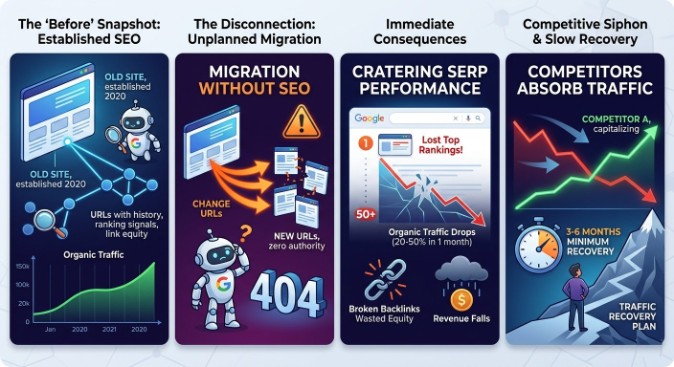
Here’s the blunt truth. When you migrate a website without factoring in search engine optimization, you’re essentially telling Google to forget everything it knows about you.
Every URL on your site carries ranking signals — link equity, historical crawlability data, indexing signals, and user engagement patterns. Change those URLs without proper redirects? Google treats them as brand-new pages with zero authority. Your domain authority takes a hit. Your backlink profile fractures. And your SERP performance craters.
It gets worse. Search engine crawling doesn’t happen instantly. Google operates on a crawl budget — the number of pages it’s willing to crawl on your site within a given period. During a migration, the search engine needs to discover your new URLs, process your 301 redirects, and re-index everything. That takes time—weeks, sometimes months, for larger sites.
During that window, your competitors are happily absorbing the traffic you’re losing.
What Happens When You Ignore SEO During a Migration
The consequences aren’t hypothetical. They’re measurable and painful:
- Organic traffic drops of 20–50% are common within the first month, with seo visibility improvement stalling
- Broken backlinks waste the link equity you spent years building
- Duplicate content issues confuse search engine indexing and dilute keyword visibility
- 404 errors spike, sending users (and Googlebot) to dead ends — performance optimization grinds to a halt
- Revenue falls because conversions and conversion rate improvement dry up when traffic disappears
- Traffic recovery can take 3–6 months for moderate losses, and 6–12 months for severe ones, requiring a dedicated traffic recovery plan.
A poll of over 1,300 SEO professionals found that roughly 80% expect some traffic loss after a site migration. That’s the norm, not the exception. The question isn’t whether you’ll see a dip. It’s how deep that dip goes and how fast you recover.
The Good News — A Smart Migration Can Actually Boost SEO
Don’t let the doom-and-gloom scare you into inaction. A migration is actually one of the best opportunities to improve your technical SEO foundation. Here’s why:
- You can clean up years of technical debt — crawl errors, bloated XML sitemaps, messy robots.txt files
- Consolidating thin content builds stronger topical authority through topic clustering and topic authority building, filling content gaps identified during content gap analysis.
- Fixing your internal linking structure improves crawlability and user experience (UX)
- Upgrading page speed and responsive design satisfies mobile-first indexing requirements and boosts site performance optimization.
- Content optimization during migration — including on-page optimization and title tag updates — can lift keyword rankings you’d been stagnating on
- Cleaning up duplicate content issues and missing metadata issues strengthens keyword relevance signals across the board.d
Companies that get this right don’t just survive. They thrive. One multi-domain migration case study showed traffic exceeding expectations by 14.5% within a year, with zero downtime in rankings.
How Long Does an SEO Migration Actually Take?
Forget the vague “it depends” answers. Let’s talk real timelines.
| Phase | Small Site (<500 pages) | Mid-Size (500–5,000 pages) | Enterprise (5,000+ pages) |
| Migration planning + pre-launch audit | 2–4 weeks | 4–8 weeks | 8–16 weeks |
| Launch execution | 1 day | 1–2 days | 1–3 days |
| Post-launch audit + monitoring | 4–8 weeks | 8–16 weeks | 3–6 months |
| Full ranking recovery | 2–8 weeks | 4–12 weeks | 3–6 months |
Several factors stretch these timelines. Legacy redirect chains from previous migrations. Multiple domains or subdomain migrations. International sites with complex hreflang implementations. Massive content migration projects where thousands of pages need manual URL prioritization and content prioritization decisions.
The takeaway? SEO execution isn’t a weekend project. Build realistic buffers into your project timeline and project timeline planning process — because rushed migrations produce the worst outcomes. Every migration phase needs breathing room for QA testing, SEO validation, and staging environment testing before moving forward.
How Much Does an SEO Migration Cost?
Let’s talk numbers. SEO migration costs vary dramatically based on scope and complexity. Here’s what the market looks like in 2026:
| Site Size/Complexity | DIY Cost | Agency/Professional Cost |
| Small site (under 100 pages) | $100–$500 | $2,000–$5,000 |
| Mid-size site (100–1,000 pages) | $500–$2,000 | $5,000–$15,000 |
| Large/enterprise site (1,000+ pages) | Not recommended | $15,000–$50,000+ |
| E-commerce with complex integrations | Not recommended | $20,000–$50,000+ |
Those numbers cover the migration itself. But don’t forget the hidden costs that creep in: extended QA testing, SEO monitoring software subscriptions (SEMrush, Screaming Frog, Moz Pro), developer hours to fix post-launch redirect errors and other technical issues, and the revenue you lose during any traffic fluctuations. Factor in performance-metric tracking tools, engagement-tracking platforms, and potential site downtime risks during the cutover itself.
Here’s the bottom line. Skimping on SEO during a migration is the single most expensive mistake you can make. A $2,000 shortcut today can easily cost $50,000 or more in lost organic traffic and customer acquisition over the following year.
Need expert help? The digital marketing team at Admark Digital specializes in SEO migration services that protect your rankings throughout the process. From migration planning to post-launch audits, their team handles the complexity so you don’t have to gamble with your traffic. Get a free SEO migration consultation from Admark Digital today.
The Complete SEO Migration Checklist — Phase by Phase
This is the core of everything. We’ve organized this SEO site migration checklist into three clear migration phases: Pre-Migration, Launch Day, and Post-Migration. An SEO migration scoring system helps you prioritize which URLs and tasks demand the most attention within each phase. Follow them in order. Skip nothing.
Phase 1: Pre-Migration (Where You Win or Lose the Battle)
Every successful website migration lives or dies in the planning stage. This is where 90% of the real work happens. Rush through it, and you’ll spend months trying to recover. Do it right, and launch day becomes almost anticlimactic.
Define Your Migration Scope and Goals
Before touching a single line of code, document exactly what’s changing and what isn’t. Is this a domain change SEO project? A CMS migration strategy execution? A website redesign, SEO overhaul? Perhaps a site relaunch strategy that involves a complete website restructuring? Each demands different resources and a different digital marketing strategy.
Assign clear ownership. Your SEO team handles redirect mapping and on-page SEO. Your web development team manages the staging website and deployment. Your project managers coordinate stakeholder communication and cross-team collaboration. Without clear roles, things slip through the cracks fast.
Create a shared project timeline with milestones. Include a rollback plan and rollback strategy — because if something goes catastrophically wrong on launch day, you need an exit strategy. Ensure cross-team coordination among all departments involved.
Benchmark Your Current SEO Performance
You can’t measure what you don’t track. Before the migration begins, capture a comprehensive snapshot of your current state:
- Run a full site crawl using Screaming Frog, Sitebulb, or similar SEO crawling tools
- Export current keyword rankings and top landing pages from Google Search Console
- Document your organic traffic baseline in Google Analytics (GA4)
- Pull a complete backlink audit using SEMrush, Ahrefs, or Majestic
- Record Core Web Vitals and page speed scores
- Screenshot your SERP performance for money keywords — these are your “before” photos
- Log engagement metrics: user sessions, bounce rate, conversion tracking data
This baseline becomes your north star. Every post-migration comparison starts here. Without it, you’re flying blind during traffic drop analysis.
Back Up Everything
This isn’t negotiable. Create complete backups of:
- Full site files, database, and media assets
- All Google Analytics and Google Search Console data exports
- Current XML sitemap (sitemap.xml), robots.txt, and .htaccess files
- Meta tags, title tags, and meta descriptions for every page
- Your existing structured data implementation
- Attribution data and conversion tracking configurations
Store backups in multiple locations. If something breaks, these backups are your lifeline.
Build a Staging Environment
Set up a staging website that mirrors your new production environment exactly. This is where you test everything before it goes live on your website.
Critical rules for your staging site:
- Block it completely from search engine indexing — use a noindex tag AND password protection
- Mirror your 301 redirects, canonical tags, and internal links exactly as they’ll appear on the live site
- Test page performance, mobile usability, and responsive website design thoroughly
- Validate all structured data implementation and HTML markup using Google’s Rich Results Test
- Check browser compatibility across devices
- Review all site configuration settings to ensure they match your production requirements
Your staging environment is your safety net. Whether this is a full site relaunch strategy or a targeted website restructuring, test everything here ruthlessly before going live.
Map Every URL — No Exceptions
This step alone can make or break your migration. Create a comprehensive redirect mapping spreadsheet: old URL → new URL, for every single indexed page.
Your URL mapping strategy should:
- Prioritize high-traffic and high-authority pages first (this is your SEO scoring model)
- Flag URLs with no logical destination for content consolidation or retirement
- Include query parameter variations, pagination URLs, and filtered pages
- Account for anchor text changes in internal link updates
- Document the content inventory — what’s moving, what’s merging, what’s being retired
For large sites, this spreadsheet can run into thousands of rows. That’s normal. Every unmapped URL becomes a potential 404 error waiting to happen.
Plan Your 301 Redirect Strategy
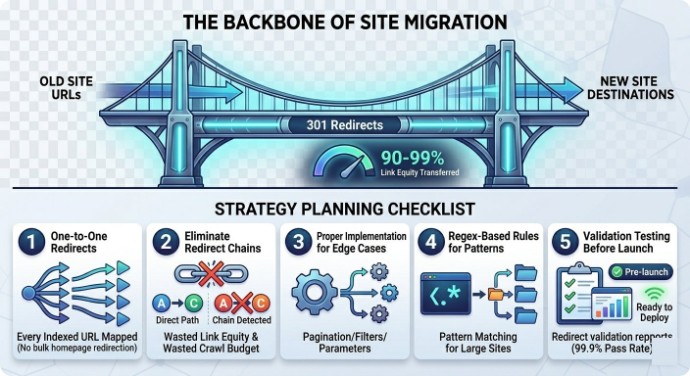
301 redirects are the backbone of any site migration SEO project. They tell search engines (and users) that a page has permanently moved, transferring approximately 90–99% of the original page’s link equity to the new destination.
Your redirect strategy planning must address:
- One-to-one redirects for every indexed URL — no bulk redirecting everything to the homepage
- Redirect chains elimination (A → B → C kills page speed and wastes link equity)
- Proper 301 redirect implementation for edge cases: pagination, filtered URLs, parameterized URLs, and old campaign landing pages
- Regex-based redirect rules for pattern-based changes on large sites
- Redirect validation testing before launch
A word of warning: redirect loops are migration killers. Test every redirect path in your staging environment before going live.
Audit and Update Internal Links
Don’t rely on redirects for your internal linking structure. Repoint every internal link to its new URL. Redirects add latency and waste crawl budget. Direct links are cleaner, faster, and better for crawlability.
While you’re at it:
- Fix orphaned pages in the new site structure
- Verify breadcrumb trails and navigation optimization
- Review anchor text optimization — make sure link text still matches user intent and target search queries
- Ensure your user journey optimization isn’t broken by dead-end pages
Migrate or Rebuild Structured Data (Schema Markup)
Schema markup is easy to overlook and devastating to lose. Your structured data powers rich snippets in search results — review stars, FAQ dropdowns, product prices, event dates. Lose them, and your click-through rates plummet.
Before migration:
- Audit all existing Schema.org markup — what’s present, what’s missing
- Don’t copy-paste unthinkingly. Validate everything against the new URL structure.
- Handle structured data implementation differently based on your setup:
- JSON-LD hardcoded in page templates — update URLs and references manually
- Schema injected via Google Tag Manager (GTM) — verify GTM fires correctly on the new site
- Schema managed through a CMS plugin — confirm plugin compatibility with the new platform migration
- Test with data markup validation tools before launch
- Ensure rich results optimization isn’t lost in the transition
Prepare Your XML Sitemap
Your XML sitemap is Google’s roadmap to your site. Proper XML sitemap creation matters — get it wrong, and search engine crawling becomes chaotic.
- Generate a new sitemap.xml reflecting the post-migration URL structure
- Keep the old sitemap accessible temporarily — it helps Google discover your redirects faster
- Remove noindexed, redirected, and retired URLs from the new sitemap
- Run sitemap submission through Google Search Console and Bing Webmaster Tools immediately after launch
Update Robots.txt
Your robots.txt file controls crawl directives — telling search engines what to crawl and what to ignore. During migration, small mistakes here cause massive problems.
- Review all crawl directives for the new site structure
- Confirm you’re not accidentally blocking critical pages, CSS files, or JavaScript resources
- Remove staging disallow rules before launch — this is one of the most common mistakes in web migrations
- Verify robots.txt optimization and crawl directives management don’t conflict with your indexing directives
Choose Your Launch Date Strategically
Timing matters more than you’d think. A bad launch strategy can amplify even minor migration issues into major revenue losses. Your go-live process should avoid:
- Peak traffic periods and major sales events (Black Friday, holiday seasons)
- Fridays (you want your web development team available for emergency fixes through the weekend)
- Days when your digital marketing team or key stakeholders are unavailable
- Periods when scheduled marketing campaigns or email blasts point to URLs about to change
- Months when your industry traditionally sees the highest organic traffic — protect your revenue window
The best launch windows? Tuesday through Thursday mornings, during your lowest traffic period. This gives you maximum response time if something goes wrong. Check your Google Analytics data to identify your quietest day and time — that’s your sweet spot.
Coordinate with every team involved. Your SEO team, developers, content managers, and paid media team all need to know the exact deployment schedule. A launch readiness checklist shared across teams prevents last-minute surprises.
Consider a Phased Migration
For large or complex sites, a phased migration approach dramatically reduces risk. Instead of flipping everything at once, you migrate in stages:
- Phase 1: Blog and informational content
- Phase 2: Product or service pages
- Phase 3: Category and navigation pages
- Phase 4: Remaining site sections
Each phase gets its own QA testing, monitoring window, and validation cycle. This phased migration approach means if something breaks in Phase 1, you catch it before it contaminates the rest of the site. Think of each migration phase as its own mini-SEO site transition, with independent SEO risk-mitigation controls.
For smaller sites with straightforward changes, a full cutover is usually fine. The phased migration approach shines on enterprise websites with thousands of pages and complex integrations, where platform migration SEO risk compounds across every section.
Phase 2: Launch Day Execution
If you did Phase 1 properly, launch day should feel almost boring. That’s a good sign. Here’s your deployment checklist:
Deploy Redirects and Verify
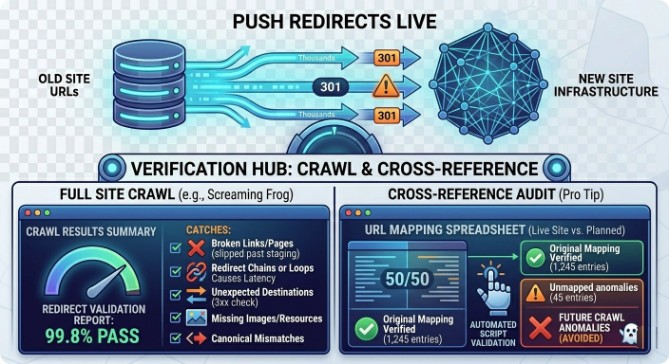
Push all 301 redirects live. Immediately spot-check a sample of your highest-priority redirects manually. Then run a full site crawl with Screaming Frog or similar website audit tools to catch:
- Broken links and broken pages that slipped through staging
- Redirect chains or redirect loops create unnecessary latency
- 3xx redirects pointing to unexpected destinations
- Missing images or broken resource paths are affecting page performance
- Canonicalization issues on the new URL structure
- Site errors that weren’t visible in the staging environment
Pro tip: run your redirect audit against your original URL mapping spreadsheet. Cross-reference every single entry. The ones you miss today become the crawl anomalies that haunt your indexing status tracking for months. For large sites with thousands of redirects, automated redirect validation scripts save enormous time and catch errors that human eyes would miss.
Submit the New Sitemap to Search Engines
- Upload your new XML sitemap to Google Search Console and Bing Webmaster Tools.
- Use Google’s “Change of Address” tool if you’ve completed a domain migration.n
- Request indexing for your most critical pages — don’t wait for Google to find them organically.
- Monitor your indexing report for crawl errors within the first 24 hours
Verify Mobile Usability
Google uses mobile-first indexing. That means your mobile site IS your site in Google’s eyes. This isn’t a nice-to-have anymore. It’s the foundation of your search engine indexing strategy.
- Test responsive design across multiple devices and screen sizes
- Check tap targets, font sizing, and mobile optimization SEO basics
- Run page speed tests on mobile — not just desktop
- Verify that page rendering issues aren’t hiding content from Googlebot’s mobile crawler.
- Confirm that UX improvements and SEO changes haven’t broken the user journey optimization on smaller screens.
- Use Google’s Mobile-Friendly Test to validate every key template
Launch a Custom 404 Page
Some 404 errors are inevitable during migration. Make sure your 404 page helps users rather than bouncing them:
- Include clear navigation and a search bar
- Link to popular content and key category pages
- Keep the tone helpful, not generic
- Ensure the page returns a proper 404 HTTP status code (not a soft 404)
Phase 3: Post-Migration Monitoring (The Part Most People Skip)
This is where most migrations fall apart. Teams celebrate launch day, move on to the next project, and stop watching the metrics. Meanwhile, crawl anomalies and indexation issues silently erode their rankings. Without consistent organic traffic monitoring and real-time traffic monitoring, you won’t catch problems until the damage is severe.
Don’t make that mistake. Post-migration SEO monitoring should last for 3–6 months. This is where SEO performance metrics tell you whether the migration succeeded or where indexing issues and technical issues still need attention.
Run a Full Post-Launch SEO Audit
Within 24–48 hours of launch, crawl your live website and compare results against your pre-migration baseline. Check for:
- Broken links and broken page fixes are needed
- Missing metadata issues — lost title tags and meta descriptions
- Duplicate content issues created by the migration
- Canonical tags pointing to old URLs
- Crawl errors in Google Search Console
- Schema markup SEO discrepancies
- Indexing errors that signal problems with the indexing process or search engine response
Monitor Index Coverage Daily
Watch Google Search Console’s index coverage report like a hawk for the first few weeks. You’re looking for:
- Spikes in “Excluded” or “Error” pages
- Indexing errors on high-priority URLs
- Pages stuck in “Discovered – currently not indexed” status
- Indexation control issues where Google is ignoring your canonical tags
Track 404 Errors and Fix Them Fast
404 error handling is an ongoing process after migration, not a one-time task.
- Set up 404 tracking in GA4 using page_title containing “404” or a custom event
- Monitor server logs for crawl errors from Googlebot
- Prioritize fixing 4xx errors on pages that previously had traffic or backlink equity
- Use real-time analytics to catch spikes in error page visits
- Cross-reference with the Wayback Machine to identify legacy URLs you might have missed
Update External Signals
Your website doesn’t exist in isolation. Every external link pointing to your old URLs represents backlink equity that needs attention. Update every external reference:
- Google My Business and Bing Places listings (critical for local SEO optimization and business listing optimization)
- Top referring domains — reach out personally and request URL updates for link reclamation and backlink recovery
- Social media profiles, directory listings, and citation management entries
- Email signatures, newsletter templates, and marketing automation integration links
- Active paid ad campaigns — don’t waste budget sending traffic to redirected URLs
- External links in guest posts, press mentions, and partner sites
- Industry directories and customer acquisition funnel touchpoints
For fixing broken links at scale, tools like Moz Link Explorer and SEMrush can identify your highest-value broken backlinks, so you can prioritize outreach to the sites that matter most. This backlink recovery work is tedious but essential. Every fixed link strengthens your brand visibility and SEO on the new domain.
Keep Your Old Domain — Seriously
If you’ve changed domains, maintain ownership of the old one for at least 1–2 years. Keep redirects active. If someone else buys your old domain, every redirect you set up becomes worthless — and all that link equity transfer evaporates overnight.
This is one of the cheapest insurance policies in SEO. Domain renewal costs practically nothing compared to the website authority you’d lose.
Measure Performance Over 3–6 Months
Don’t panic at week one. Some traffic fluctuations are completely normal as Google processes the migration. Here’s what to expect:
| Timeframe | Normal Behavior | Red Flag |
| Week 1 | 5–15% traffic dip, SERP volatility | 30%+ drop, mass deindexing |
| Month 1 | Gradual traffic recovery, some keyword ranking tracking movement | Continued decline, no indexing progress |
| Month 3 | Traffic approaching or exceeding baseline | Still below 70% of pre-migration levels |
| Month 6 | Full ranking recovery or improvement | Persistent losses on key pages |
Use your pre-migration benchmarks to track pre vs. post-migration analysis across:
- Organic traffic volume and trends
- Keyword visibility and ranking performance
- Conversion tracking and revenue metrics
- Engagement rate tracking — bounce rate, user sessions, time on site
- Page performance and Core Web Vitals
If ranking drops persist beyond 8–12 weeks, something needs investigation. Common culprits include missed redirects, canonicalization issues, duplicate-page errors, crawl-budget optimization problems, and user-behavior tracking signals indicating poor contextual relevance on redirected pages.
Track your SEO KPIs on the tracking dashboard weekly. Focus on organic visibility improvement, traffic retention, and conversion optimization SEO metrics. Build a traffic recovery plan if numbers aren’t trending upward by month two. And don’t ignore SERP fluctuations — they reveal how search engine behavior and AI-driven search algorithms are interpreting your new site structure.
Struggling with post-migration recovery? Admark Digital’s experienced SEO team provides comprehensive SEO migration services that don’t end at launch. Their SEO performance tracking and ranking recovery strategy helps businesses regain — and often exceed — their pre-migration traffic levels. Contact Admark Digital for a migration recovery audit.
Essential SEO Tools for Your Migration Toolkit
You’ll want these website audit tools and SEO reporting tools in your arsenal:
| Tool | Primary Use |
| Screaming Frog | Site crawl, crawl diagnostics, redirect validation |
| Google Search Console | Indexing status tracking, crawl errors monitoring, sitemap submission |
| Google Analytics (GA4) | Traffic analysis, session tracking, conversion tracking |
| SEMrush | Keyword tracking tools, backlink analysis tools, and site audit platforms |
| Moz Pro / Moz Link Explorer | Domain authority tracking, backlink profile analysis |
| Majestic | Referring domains analysis, link equity assessment |
| Google Tag Manager (GTM) | Structured data implementation, event tracking, and tag management |
| Bing Webmaster Tools | Bing-specific indexing report and crawl diagnostics |
These tools form the backbone of your SEO monitoring software stack. Pair them with analytics dashboards for real-time visibility into performance metrics and engagement tracking data. Use them throughout all three phases — not just post-launch.
Conclusion: Migrations Don’t Have to Be Scary
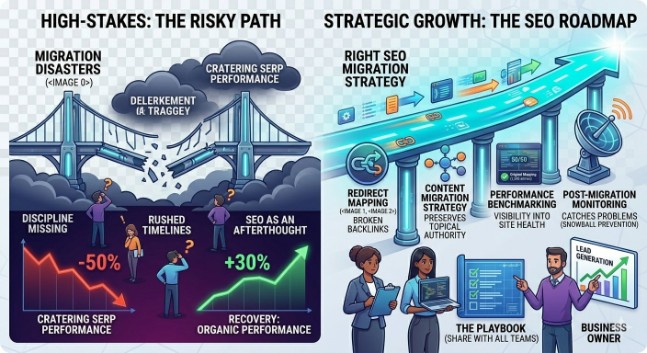
Here’s the reality. Website migrations are high-stakes projects. There’s no sugarcoating that. But the vast majority of migration disasters don’t happen because migrations are inherently dangerous. They happen because teams skip steps, rush timelines, and treat SEO as an afterthought rather than a core requirement.
With the right SEO migration strategy, a clear migration roadmap, and disciplined SEO execution across every phase, you can migrate your website without losing your search engine rankings. In fact, you can come out the other side with better organic performance than you started with.
Every step in this SEO website migration checklist exists for a reason. The redirect mapping prevents broken backlinks. The content migration strategy preserves topical authority. The performance benchmarking gives you visibility into what’s working and what needs fixing. And the post-migration monitoring catches problems before they snowball into full-blown traffic crises.
Think of this checklist as your site migration risk mitigation playbook. Print it out. Share it with every team member involved. Whether you’re a project manager overseeing a website migration project, an SEO specialist running the technical SEO work, or a business owner trying to protect your lead generation pipeline, every person involved needs to understand the process.
The smartest brands don’t treat migrations as purely technical projects. They treat them as strategic moments for SEO growth. A chance to rebuild smarter, optimize harder, and establish a stronger search visibility preservation foundation than they had before. They focus on performance optimization, organic traffic retention, search-intent optimization, and entity-based SEO principles to make the new site even more competitive than the old one.
Admark Digital has guided businesses through complex site migrations — from e-commerce migrations to full enterprise SEO site overhauls. Their team brings deep expertise in technical SEO, content optimization strategy, semantic search optimization, natural language processing SEO, and search performance monitoring to ensure your migration protects what you’ve built while positioning you for long-term SEO strategy success. Their SEO migration services cover every phase — from initial content audit, SEO, metadata optimization, and domain history analysis to deployment strategy execution, lead-generation SEO, and SEO KPI tracking during recovery. They understand crawl prioritization, search engine behavior, knowledge graph signals, and the depth of topical coverage that modern conversion rate improvement demands.
Don’t leave your rankings to chance. Whether you’re planning your first migration or recovering from a failed one, having the right partner makes all the difference. Bookmark this checklist, share it with your team, and approach your next migration with confidence — not fear.
Your organic traffic is worth protecting. Treat it that way.
Planning a migration soon? Start with the checklist above. Share it with your SEO team and web development team. And if you need hands-on guidance, Admark Digital is ready to help you make your next move your best one.